// blog
How We Built Our Client Portal: Sign-In, the Project Board and Payments
The portal is a React app served as static files, with an ASP.NET Core API and PostgreSQL behind it. Accounts are confirmed by email once; clients sign in with a password and an authenticator code, and only hashes of passwords and links are stored. The project board is the same list we work from, and moving a card can set the project’s status. Payments happen on Stripe’s or PayPal’s own pages.

We built a client portal so our clients can follow their project on a board of tasks, ask questions in one place and pay invoices online. This post is for the technically minded: how it’s put together, and the choices behind it.
The stack
The portal is a React and TypeScript app, served as static files like the rest of aiwebcenter.com. Everything in it comes from an ASP.NET Core API with PostgreSQL behind it. The site’s Content Security Policy allows only our own scripts and styles: no inline scripts, no third-party code, no tracking. Even the bars on the tracker are sized from code rather than inline styles, because the policy wouldn’t allow them.
Accounts and sign-in
Anyone can make an account with a name and an email address. The address is the username, and it’s confirmed once by a link we email. Until that link is used there’s no account at all, just the request, which is deleted after 30 days.
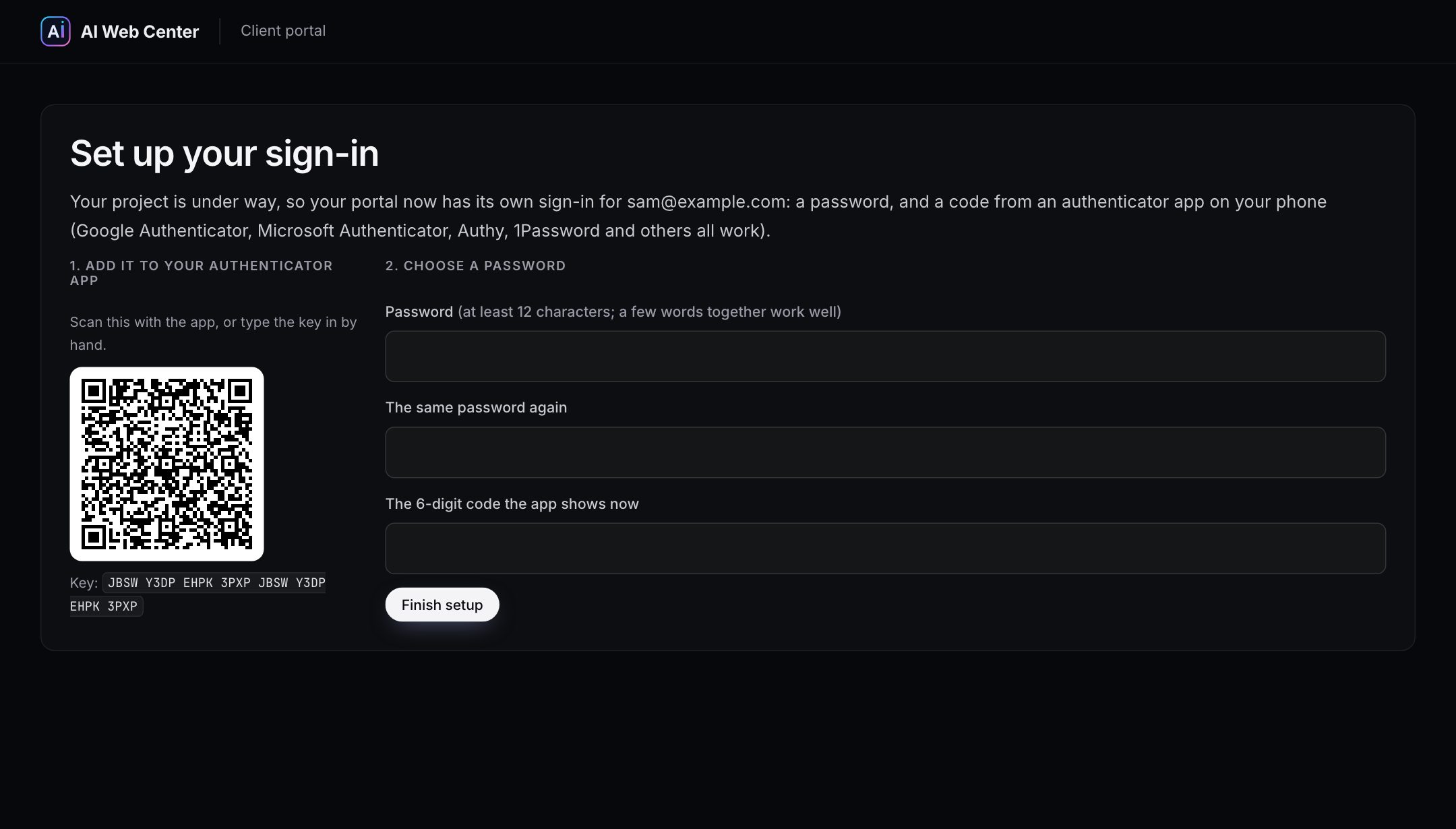
Before a project starts, that’s all an account needs. Once someone becomes a client, the portal holds their project, invoices and payments, so it asks for more: a password and a code from an authenticator app. They set it up once, through a link sent to their address, which is the proof the address is theirs:
- Scan a QR code with the authenticator app on their phone.
- Choose a password of at least 12 characters.
- Enter the code the app shows, and save eight recovery codes.
What we store is deliberately little:
- Passwords only as a salted PBKDF2-SHA256 hash with 600,000 iterations, never the password itself
- The authenticator key encrypted with the server’s data-protection key
- Links and recovery codes only as SHA-256 fingerprints, so a stolen database holds no working link or code
- Each code once: a code already used can’t be used again, and five wrong tries in a row lock that sign-in for 15 minutes
Emailed links are opened in two steps: the link shows a page with a button, and only the button signs in. That’s because many company mail systems open every link in an email to scan it, which would otherwise use the link up before the person ever sees it.
The board stays in step with the work
The tracker’s board isn’t written for the client after the fact. It’s the list we work from in our own admin, where cards are added, dragged between columns and edited. The client sees the same cards, read-only.
Moving cards also keeps the project’s status honest. When the first card goes into progress, the project shows as In progress. When every open card is the client’s move, it shows as Waiting on you. When every card is done, it’s Ready for your review. Paused or finished projects are left alone, and the automation can be switched off per project.
Progress, the schedule and “Waiting on you” are worked out from the cards in the browser, so they can’t drift from what the board shows.
Payments without card numbers
Invoices are paid on Stripe’s or PayPal’s own checkout page. A payment counts only when the provider confirms it to our server directly (a signed webhook or a lookup), never because a browser says it went through. No card or bank number ever reaches our server.
Built for our own work, the way we’d build it for yours
The portal is a working example of what we do for clients: a real system that handles accounts, data and money, built carefully and checked with tests at every step. If your business needs something similar, see our example portals for an accounting firm and for law firms and clinics, or make an account and look around ours.
Frequently asked questions
What is an authenticator code?
A six-digit number from an app on your phone, such as Google Authenticator, Microsoft Authenticator, Authy or 1Password. It changes every 30 seconds. With it, someone who learns your password still can't sign in without your phone.
What if I lose my phone?
Each client gets eight one-time recovery codes when they set up the sign-in; any of them works instead of a code. If those are gone too, we reset the sign-in and email you a link to set it up again.
Can the same portal be built for my business?
Yes. It's the kind of thing we build for clients: accounts, a board or tracker, messages and payments, on your own domain. Our example portals for a CPA firm, a law firm and a clinic show other versions of it.




































































































































