// blog
Our Client Portal: Every Task of Your Project on One Board
Every AI Web Center project now has a page in the client portal. Its project tracker is a board of tasks in four columns (To do, Scheduled, In progress, Done), each card with its due date and whose move it is, under the target completion date, progress and schedule. Questions to Jan are answered in the same place, invoices are paid online, and a $500 startup project can be ordered there.

When you hire someone to build software, most of what happens is out of sight. You get a start date, a price and a promise, and then you wait for the next email. If something slips, you often hear about it late.
Our clients don’t wait for an email. Every project now has a page in the client portal, and its project tracker shows every task on one board, as it moves.
What the tracker shows
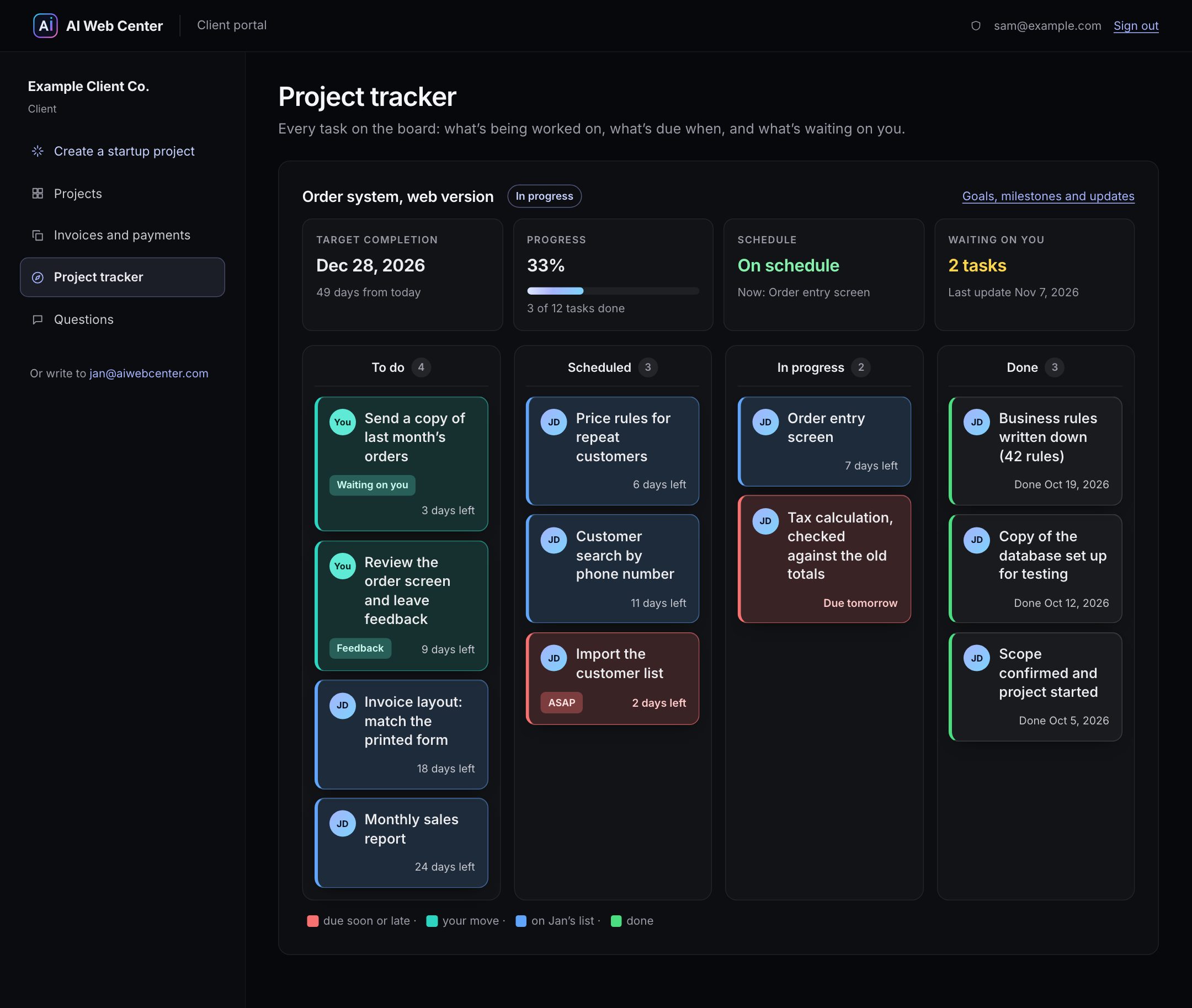
At the top, the four numbers a client wants first:
- Target completion: the date, and how many days that is from today
- Progress: how many tasks are done, with a bar
- Schedule: “On schedule”, or how many tasks are past their date. A late task shows as late; nobody tidies it up first.
- Waiting on you: how many open tasks need something from the client, such as a file, an answer or a review
Under that, the board: To do, Scheduled, In progress and Done. Each card says what the task is, when it’s due (“6 days left”, “Due tomorrow”) and whose move it is. Cards turn red when they’re urgent or due within two days, and teal when it’s the client’s move. Done cards keep the date they were finished.
What else is in the portal
The portal has a menu on the left, and each part is one click away:
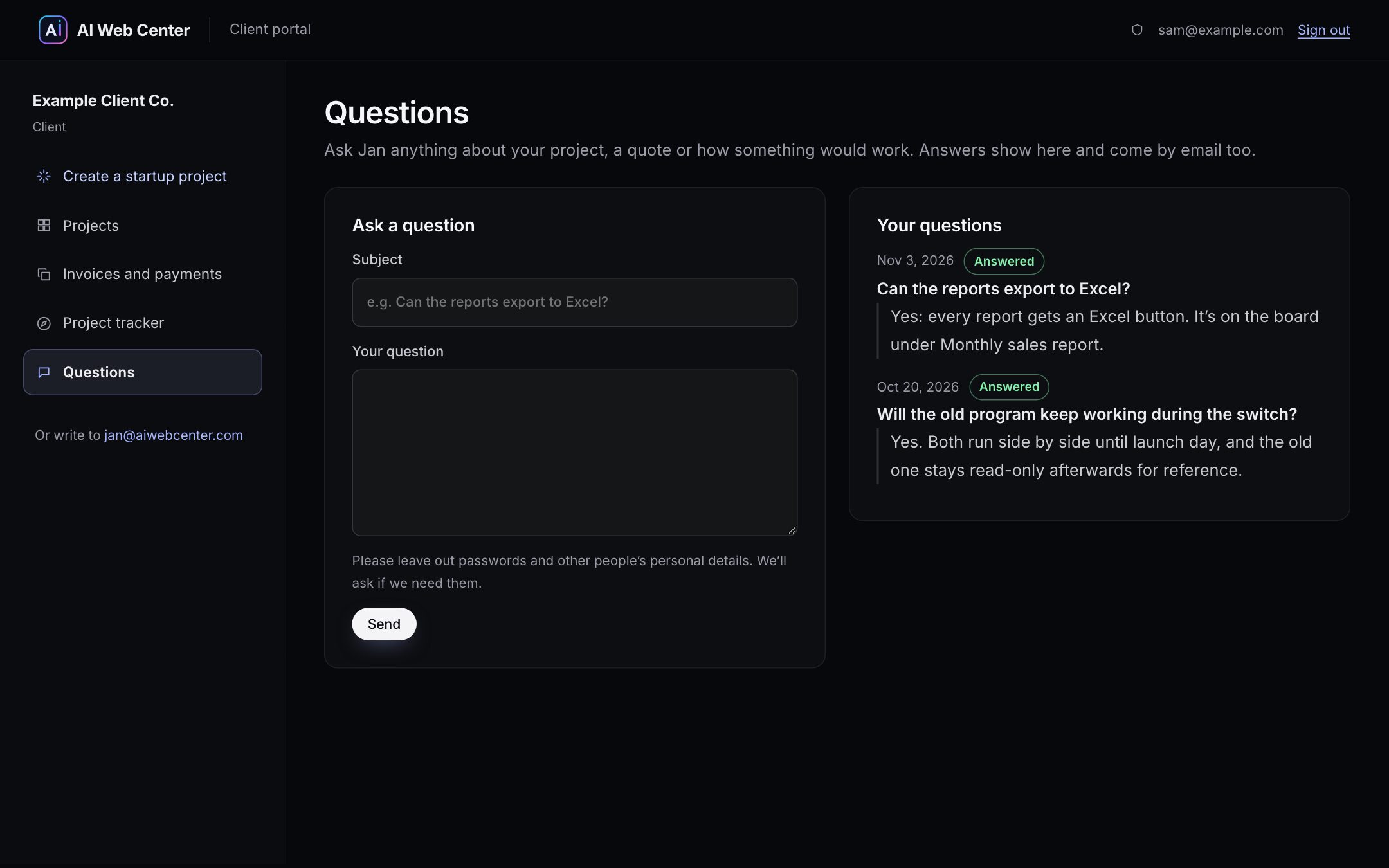
- Questions opens first. Ask anything about the project, a quote or how something would work; the answer appears under the question and comes by email too.
- Projects has each project’s goals, its milestones (each one linked to the invoice that pays for it) and every update Jan posts.
- Invoices and payments lists each invoice and payment. Invoices are paid by card, bank account or PayPal on Stripe’s or PayPal’s own page, so no card or bank number ever reaches our server.
- Create a startup project orders a $500 proof of concept: one part of your program or idea, working, before you decide on the whole project. It gets its own board too.
Why we built it
Much of our work is turning old desktop programs into web apps: an order system written in Delphi twenty years ago, an accounting program only one computer in the office can run. Those projects run for weeks, and the people paying for them are running a business at the same time. They shouldn’t have to chase anyone to find out where things stand.
So the board isn’t a report we write once a week. It’s the list we work from. When a task moves, the client’s board moves with it.
See it for yourself
Make an account with your name and email address. Until you have a project, the tracker shows the example project from these screenshots, so you can see how yours would look. If you’d like to talk about a project first, the legacy app conversion page explains how we work.
Frequently asked questions
Who can see a project's board?
Only the client it belongs to, signed in to their own portal. A client sees their own projects, questions and invoices, never anyone else's.
Can I see the portal before I hire you?
Yes. Make an account with your name and email address. Until you have a project, the tracker shows an example project, so you can see exactly how yours would look.
Is the project in the screenshots real?
No. Example Client Co. and its order system are sample data. The portal is the real one our clients use.




































































































































