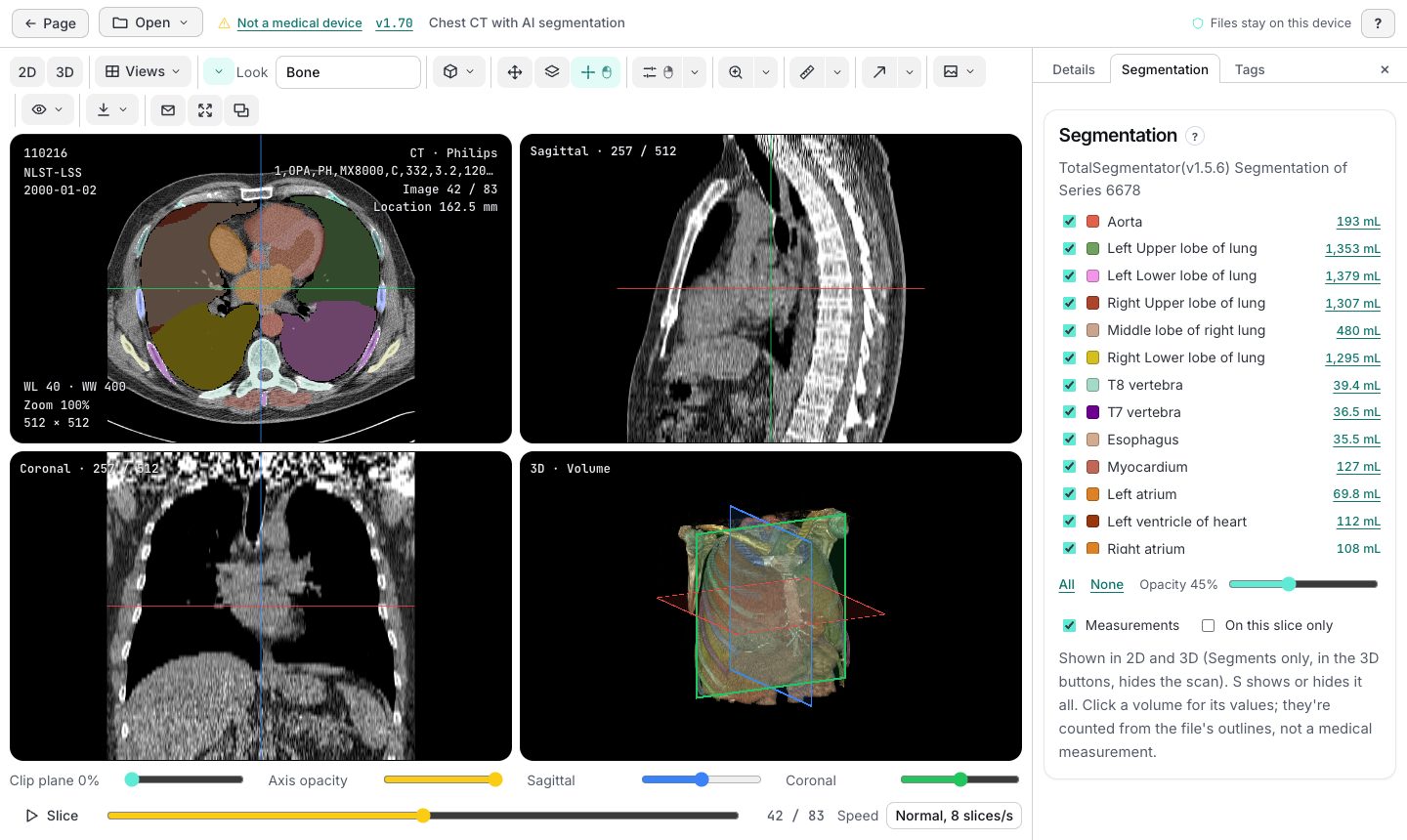
A series of at least 16 gray slices of one size stacks into a volume, at its real spacing.
Press 3D.
Drag to turn it, or use the arrow keys.
The mouse wheel moves the clip plane into it from the side facing you; Ctrl or ⌘ with the wheel zooms.
Reset (R) brings back the first view.
Volume, MIP and Planes
Three ways to show the volume, under 3D view.
Volume colours the values by the Look you pick.
MIP shows the brightest value along each line of sight.
Planes shows three crossing cuts.
Image + 3D and four views
Under Views.
Image + 3D: the image with the 3D view beside it; click the 3D view to go to that spot.
Four views: the image, the side and front cuts, and 3D, all pointing at one spot. Crosshair (X) moves the spot.
Double-click a view to make it big; again for four alike.
Measure works on the cuts too.
4D: a volume in time
A 4D ultrasound or a 4D CT series has a time bar under the image.
Play runs it in time, on the same slice or in 3D.
Try the Breathing chest CT (4D) sample: ten phases of one breath, each a whole volume. Play on a slice shows the diaphragm move; in 3D, pick a Look and play.
The viewer is a technology demonstration for teaching and research, not a medical device. It reads nothing into an image itself. · What's new