Free tool · Medical imaging
DICOM viewer
Open your own DICOM files, or pick a sample: a chest CT, a beating heart, breathing lungs, a brain MRI, a liver ultrasound clip and two chest X-rays. Work with them the way a radiology workstation does: scroll and play, drag to set the window and level, zoom, pan, invert and measure in millimeters, with the patient, study and acquisition details beside the image and every DICOM tag below it. Your files are read in your browser and never uploaded. The samples are public research data, prepared with the OFFIS DICOM Toolkit (DCMTK).
Your files stay on your device. They are opened in this browser tab and never uploaded to a server. They are deleted from the page as soon as you click Close and delete, open something else, or leave or reload the page.
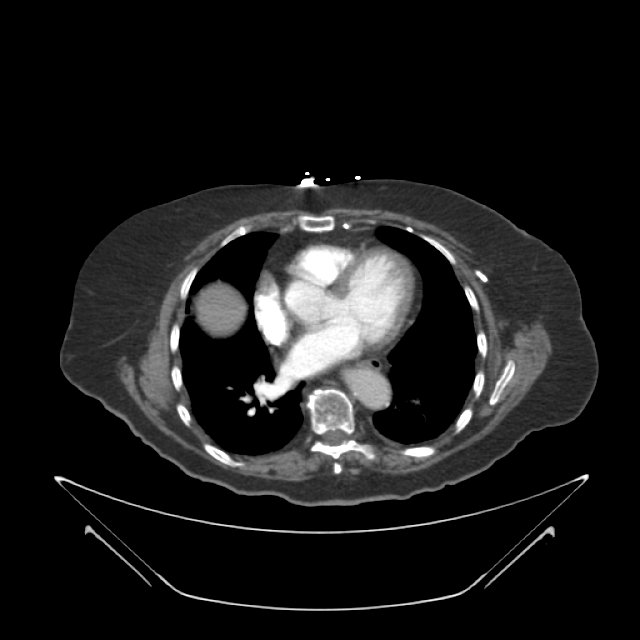
Drag: left/right changes contrast (width), up/down brightness (level). The mouse wheel or arrow keys move through the images, space plays them; Ctrl/⌘ + wheel zooms. The right mouse button always changes the window, the middle one pans. You can also drop DICOM files on the image.
A technology demonstration. It is not a medical device and not for diagnosis.
Made by AI Web Center · built on DCMTK v3.7.1
Need imaging in your own portal? Viewer, archive, integration.
I build web applications for clinics, imaging centers and health-tech teams: patient and referrer portals that show studies in the browser, connections to a PACS, and the APIs between them. Tell me what you need and get a first proposal.
Frequently asked questions
What is a DICOM file?
DICOM is the standard format and network protocol for medical images. A DICOM file holds the image pixels together with tags: who the patient is, what study and series it belongs to, which machine made it, and how to display it, such as the pixel spacing and the suggested window. A CT or MRI series is usually one file per slice.
What do window and level mean?
A CT stores far more shades of gray than a screen can show, so the viewer shows only a range of them. The level (window center) picks the middle of that range and the width sets how wide it is. A narrow lung window makes the airways visible; a wide bone window shows the skeleton. Drag left and right for the width, up and down for the level.
What are Hounsfield units?
CT values are measured in Hounsfield units (HU): water is 0, air is about -1000, fat is around -100, and bone is in the hundreds or more. Point at the CT and the lower right corner shows the value under the mouse in HU.
How are the distances measured?
With the Pixel Spacing tag of the file, which says how many millimeters one pixel covers. The X-rays were scaled down for the web, and DCMTK's dcmscale rewrote their pixel spacing to match, so the measurements stay in millimeters.
Why does the CR X-ray look inverted in the file?
It is stored as MONOCHROME1, where a higher value means darker. The viewer reads the Photometric Interpretation tag and flips it, so bone is white as usual. Press Invert to see it the other way around.
Where do the images come from, and are they real patients?
The human studies are from public research collections of The Cancer Imaging Archive (TCIA): COVID-19-AR for the chest CT and X-rays, 4D-Lung for the breathing CT, UPENN-GBM for the brain MRI and B-mode-and-CEUS-Liver for the ultrasound. The archive removes names and other identifiers before publishing: the patient ID you see is its own code. The heart is a pig's, from a published animal study. All are shared under Creative Commons Attribution licenses.
What is DCMTK, and what does it do here?
DCMTK is the open-source DICOM toolkit from OFFIS in Oldenburg, Germany: C++ libraries and command-line tools for reading, writing, converting, compressing and sending DICOM files. Here it reads every tag (dcmdump), extracts the pixels, scales the large X-rays (dcmscale) and renders the preview images (dcm2img). The browser then does the window, level, zoom and measuring itself.
Can I open my own DICOM files here?
Yes. Click Open files or Open a folder, or drop files on the image. They are read by your browser on your own device: nothing is uploaded or stored. Close and delete removes them from the page, and they are gone when you leave or reload it too. A folder or several files open as one series (the one with the most images); files that aren't DICOM are skipped.
Which DICOM files does it open?
Uncompressed files (implicit or explicit VR, little or big endian), deflated files, RLE lossless and baseline JPEG, in gray (8 or 16 bits) or color, single images or multi-frame clips. Files compressed as JPEG lossless or JPEG-LS still show all their tags, with the DCMTK command that decompresses them (dcmdjpeg or dcmdjpls); JPEG 2000 isn't supported. A DICOMDIR is only the index of a CD: open the image files in its folders instead.
Why do the heart and the lungs move?
They are cine studies: several images of the same place at different moments, which the viewer plays in a loop at the rate stored in the file. The breathing CT is a 4D CT, sorted into ten phases of one breath and shown here as a front view rebuilt from each phase's slices. The heart MRI keeps two moments of the heartbeat, squeezed and relaxed. The ultrasound clip is 38 frames in one file.
Can I use this to read my own scans?
No. This is a technology demonstration, not a medical device, and it is not for diagnosis. Ask the clinic or hospital that made your scan for the report from a radiologist.
Sources
- DCMTK, the OFFIS DICOM Toolkit (official GitHub mirror). Release 3.7.1, October 15, 2026; BSD-style license (COPYRIGHT); the modules and tools used here
- COVID-19-AR (The Cancer Imaging Archive). Chest CT and chest X-rays; Creative Commons Attribution 4.0
- UPENN-GBM (The Cancer Imaging Archive). Brain MRI (axial T2 FLAIR, processed); Creative Commons Attribution 4.0
- 4D-Lung (The Cancer Imaging Archive). Breathing chest CT, ten phases of a planning 4D CT; Creative Commons Attribution 3.0
- B-mode-and-CEUS-Liver (The Cancer Imaging Archive). Liver ultrasound clip, 38 frames; Creative Commons Attribution 4.0
- Cardiac Cine MRI images and labels of Sus scrofa at 7T (Lohr et al., Zenodo, 2023). Pig heart MRI, systole and diastole; Creative Commons Attribution 4.0
- Creative Commons Attribution 3.0 Unported
- Creative Commons Attribution 4.0 International