Northwind, from Access to the web
We took the data of Microsoft’s Northwind sample database (830 orders, 91 customers, 77 products, MIT License) and the order workflow Microsoft documents for its Northwind 2.0 Access template, and built it as a web app on React, C# and PostgreSQL. Orders go New, Invoiced, Shipped, Closed; invoicing holds stock; purchase orders are approved by a second manager; an order closes only when paid. Every rule runs on the server, 14 tests cover them, and the browser’s numbers match the server’s to the cent.
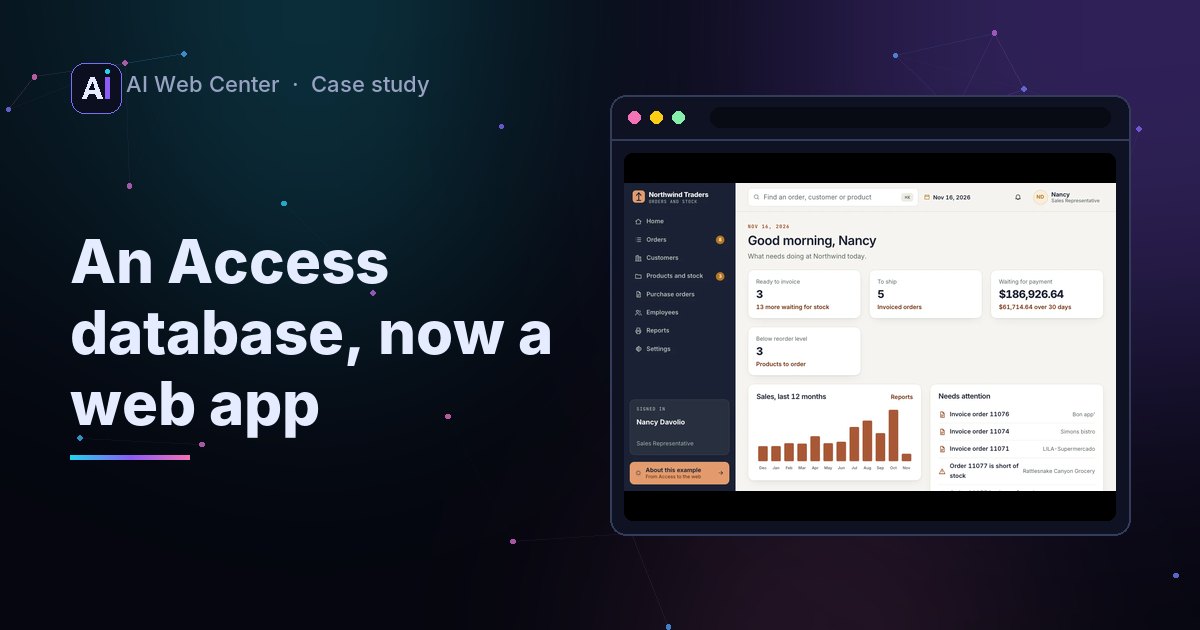
The problem
Many small businesses run on a Microsoft Access database: one file on a shared drive, Windows only, rules hidden in form code. We wanted to show, on a database everyone recognizes, what it looks like once it’s a web app.
Northwind is that database. Microsoft has shipped it with Access for decades, and the Northwind 2.0 template describes a real order workflow.
Open the web app · About the example
What we started from
| Part | Source |
|---|---|
| Customers, employees, suppliers, products, orders and every order line | Microsoft’s Northwind sample data, MIT License |
| The order workflow: New, Invoiced, Shipped, Closed, with stock checked per line | Microsoft’s Northwind 2.0 help pages |
| Screens, rules, reports, code | Ours |
The Northwind 2.0 template itself carries no license, so we didn’t copy its forms, code or text. We built the workflow from what Microsoft’s help pages describe, the way we’d work from a client’s description of their own database.
The dates moved forward so the last order falls on November 13, 2026, and the demo’s “today” is November 16. Statuses, payments and purchase orders were added to the old data by a script, and the demo buys at 70% of list price.
The rules
Each rule is one sentence, built once on the server:
- An order is invoiced only when every line has stock. Invoicing holds that stock.
- An order ships with a shipper and freight, on a date between the order date and today.
- An order closes only after its payment is recorded.
- After invoicing, the products on an order can’t change.
- Only a New order can be deleted; an invoice stays on the books.
- A purchase order holds one supplier’s products, is approved by a manager who didn’t write it, and adds its stock when received.
- Customers in Washington pay sales tax at the rate a manager sets; each invoice keeps the rate it was made with.
Microsoft’s own help page says Northwind 2.0 doesn’t check its dates, so a ship date can fall before the order date. Ours refuses that, because a client’s system should.
How it works
Every change a visitor makes is an event in their own sandbox. The server replays the data and those events to get the current state, checks the new action against it, and only then saves it. The browser repeats the stock rule so a page can show it at once, but the server decides.
The same numbers are checked in both places:
| Check | Result |
|---|---|
| Total of every order, with tax and freight | $1,333,665.18, server and browser |
| Shipped and not yet paid | $186,926.64, server and browser |
| Stock status of each line on the 16 open orders | Identical, line by line |
| Rule tests in C# | 14 passing |
| A browser walk through the whole loop, at the site’s real security settings | 31 checks passing |
Access next to the web
| In Access | On the web |
|---|---|
| Tables in the .accdb file | PostgreSQL tables on the server |
| Forms and subforms | Screens that work on a phone |
| VBA behind the buttons | C# rules every change goes through |
| Queries | Lists, filters and search |
| Reports | Print pages and PDFs |
| Login form | Sign-in, with what each person may do |
What this means for your database
Your Access database has the same parts. The work is the same too: write each rule down, check it with the people who use it, move the data and compare the totals, then switch.
Move your Access database to the web. The first call is free.